About Audio Converter
Audio Converter – Audio Editor, Mixer & Ringtone Maker Convert, edit, and enhance your audio files in seconds. Whether you want to convert music formats, trim a ringtone, remove background noise, or create trending 8D...
Audio Converter – Audio Editor, Mixer & Ringtone Maker
Convert, edit, and enhance your audio files in seconds. Whether you want to convert music formats, trim a ringtone, remove background noise, or create trending 8D effects, Audio Converter gives you an all-in-one audio studio right on your device.
🎵 Audio Converter & Format Changer
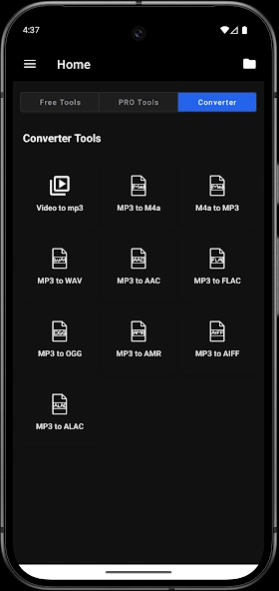
Convert across high-quality formats without losing sound quality:
MP3, M4A, AAC, WAV, OGG, FLAC, AMR, AIFF, ALAC
✂️ Audio Editing Suite
Trim & Cut Audio: Extract your favorite sections or songs precisely.
Audio Merger: Combine multiple tracks into a single file.
Audio Looper: Repeat beats or clips seamlessly.
Volume Booster: Increase or decrease audio levels up to 200%.
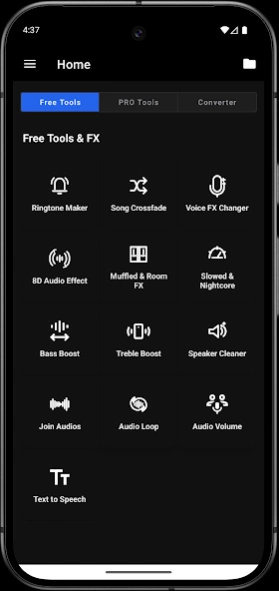
Ringtone Maker: Create custom ringtones, alarms, and notification sounds.
🎧 Audio Effects & Sound Design
8D Audio Effect: Create immersive, spatial soundscapes.
Voice FX Changer: Transform vocals with creative presets.
Slowed + Reverb & Nightcore: Speed up or slow down tracks with pitch adjustment.
Bass & Treble Boost: Enhance low-end punch and crystal-clear highs.
Crossfade & Room Effects: Smooth transitions and realistic acoustic spaces.
🔊 Enhancement & Audio Cleanup
AI Noise Reduction: Remove background hum, hiss, and ambient noise.
Speaker Cleaner: Use tuned sound waves to clear debris/water from device speakers.
Audio Compressor & Ducking: Balance dynamic range and balance voiceover volume.
Audio Censor: Easily bleep or mute unwanted words.
🎙️ Voice & Studio Tools
Vocal Remover: Separate or mute vocals to create karaoke and instrumental tracks.
Text to Speech: Convert written text into natural-sounding voiceovers.
BGM & Voice Mixer: Layer speech over background music seamlessly.
Audio Watermark: Protect your tracks with custom audio watermarks.
🏷️ Metadata & Tag Editor
Tag Editor: Edit song titles, artists, albums, and genres.
Album Art: Add, update, or remove cover artwork.
Tag Cleaner: Remove messy or broken metadata with one tap.
💡 Why Choose Audio Converter?
Simple, fast, and lightweight interface
Batch processing and fast export speeds
Studio-quality audio output
Download Audio Converter today to edit, convert, and enhance all your audio in one place!
Previous Versions
Here you can find the changelog of Audio Converter since it was posted on our website on 2026-04-05 08:51:35.
The latest version is and it was updated on 2026-10-06 12:16:22. See below the changes in each version.
Audio Converter version
Updated At: 2026-08-24
Disclaimer
Official Google Play Link
We do not host Audio Converter on our servers. We did not scan it for viruses, adware, spyware or other type of malware. This app is hosted by Google and passed their terms and conditions to be listed there. We recommend caution when installing it.
The Google Play link for Audio Converter is provided to you by apps112.com without any warranties, representations or guarantees of any kind, so access it at your own risk.
If you have questions regarding this particular app contact the publisher directly. For questions about the functionalities of apps112.com contact us.